

Connecting a Modbus bus
Modbus RTU meters and the Teracom TDI340 communicate with the CEMM via an RS485 bus. You can connect multiple devices to one bus.
For this you need:
- A USB to RS485 Modbus converter.
- A cable with a twisted pair, for example a UTP cable.
Connecting
- Connect the converter to a USB port of the CEMM.
- Connect A of the converter to A of the first device, and B to B.
- Connect the next devices in the same way, from device to device: A to A and B to B. Does the Modbus cable have multiple pairs? Then use the two wires of one twisted pair.
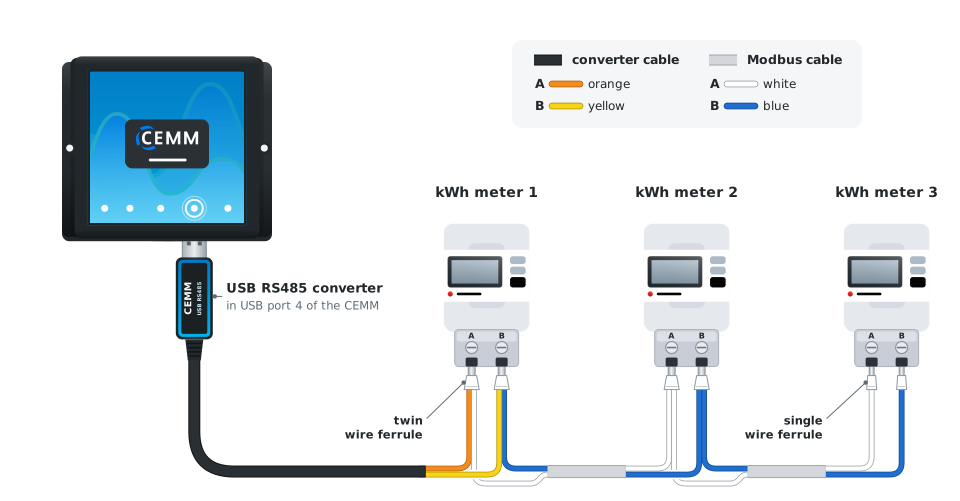
Connect the devices in a daisy chain, not in a star. The bus runs from the converter past all devices, without branches.
Your situationI also use a P1-USB cable
Do you use both the converter and a P1-USB cable for your smart meter? Then connect both of them to the USB port of the CEMM via a USB hub.
Modbus addresses
Each device on the bus has its own Modbus address. Two devices with the same address interfere with each other.
How you set or find the address differs per device. On kWh meters, you usually set it via the meter's menu. See the instructions for your meter.
You enter this address when adding the meter in the wizard.
Configuring
When you create a Modbus meter, you get the option to create an (extra) bus. In most cases, you choose the default mode and select the USB device (the RS485-USB converter). You set the baud rate and parity for each bus.
Want to check or change these settings later? Go to Settings > Meters > Modbus RTU.
Problem?The CEMM cannot find a device
- Check that the device is switched on and working properly.
- Check that the bus is connected correctly.
- Check the baud rate and parity of the bus.
- Check that the address of the meter is correct and is not used by another device on the same bus.
- As a test, you can disconnect the bus after the device, or connect the device directly to the RS485-USB converter.
Still stuck? Contact support