Changelog CEMM update 1.16
In the coming days, update 1.16 will be rolled out as a beta update. We expect the update to become available on all CEMMs within the next month.
Over the past few weeks we have published a number of news items highlighting the most important features. Here are the links to those posts:
Changelog
Dynamic tariffs
- Added support for dynamic tariffs, see Settings > Tariffs.
- Supports quarter-hourly electricity prices in NL, BE, LU and DE.
- Once configured, the CEMM retrieves (day-ahead) market prices from the ENTSO-E platform. The market price for the following day is published every day at around 13:00.
- By entering your purchase fee and feed-in fee, the CEMM can also calculate all-in prices.
- You can then choose "dynamic" instead of a fixed value in a tariff's value history, in which case the all-in prices are used.
- The prices appear in the smart meter chart as the "Prices" time series and as additional lines in "Costs".
- Because the prices are added as separate channels under the main meter, you can also use them in exports, notifications, webhooks, MQTT, etc.
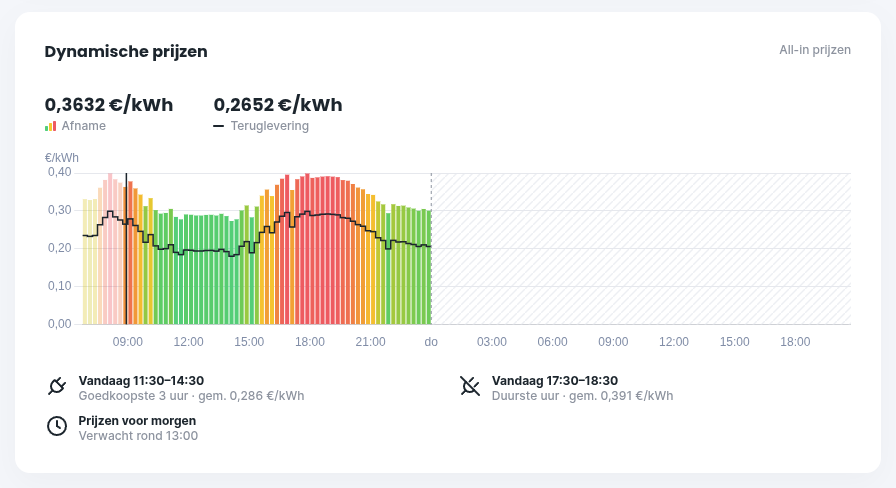
- New widget showing a chart of market or all-in prices for the rest of the day and the following day.
Battery
- Added support for batteries. By measuring how much a battery charges and discharges, the actual electricity consumption can be calculated. This measurement must be bidirectional, so a kWh meter with pulse output (S0) cannot be used, but almost all other options are suitable: Shelly, Modbus RTU, Modbus TCP, MQTT or HTTP meter. Select the "battery" role during configuration.
- Energy flow widget extended with a variant that includes a battery.
- Hybrid inverters are not directly supported. Add them with the production role for the correct calculation, or set up a connection via Modbus, MQTT or HTTP to get the correct data into the CEMM.
- A direct connection to the battery/inverter is required to read the state of charge.
New
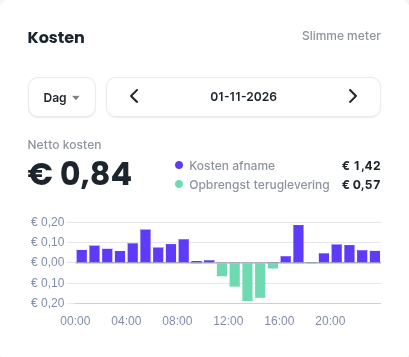
- New "Costs" widget with a daily, monthly or yearly chart (costs per hour, day or month).
- Costs can now be viewed per 15 minutes and therefore now also have a daily chart (including with fixed tariffs).
- Time series order and default time series per period are now configurable.
- Sustainability widget extended with an option to select a period.
- Added a filter and search function to the widget selection.
- With kWh meters, it is important to install them in the correct direction. It is now possible to switch the direction in software. Click "Measurement direction" on the meter's settings page to view the status and reverse the direction.
- Via Settings > Meters > Groups you can now create groups and assign meters to them. A meter can belong to multiple groups. When groups are configured, they are shown in the side menu, the dropdown navigation in the mobile view, and on the Meters page. Meters without a group automatically fall under Other.
- News items from cemm.nl are now shown as a one-time popup and can be found under "Information and support". You can disable this feature under Preferences.
- A gas or water meter can now be added via the smart meter's settings page, if the smart meter sends this data.
- Meter wizard for the e-MUCS meter extended with an option to add a water meter.
- Meter wizard for pulse meters extended with the option to enter the meter reading (optional).
- A meter's settings page now shows two buttons where applicable: "Pulse ratio" and "Set pulse meter readings". These options have always existed but are now easier to find.
Changes
- When starting an export, you are now notified immediately if it is rejected (for example, because it is too large).
- The back button on Android now also works to return to the previous screen.
- On the table page, the table header now stays visible while scrolling
- Smart meter reading made significantly more efficient (especially with DSMR 5 and e-MUCS).
Bug fixes
- Fixed an error message when revoking an invitation.
- Certain actions that sent a request to the cloud, such as showing linked users, took a long time. This is now much faster.
- The spacing between months in the bar chart on the chart page was not always equal.
- Setting up a notification for gas consumption from the smart meter wizard did not always work.
- The extra hour from the switch to winter time was not processed correctly and was therefore not shown in the charts. This has been fixed, and the extra hour of 2026 will be recalculated after the update.
- We fixed several bugs in the MQTT connection and resolved (potential) issues related to reconnecting.
- Saving Modbus RTU bus settings no longer always worked.
Screenshots
Energy flow widget, adapted to display a battery properly.
Dynamic prices widget, new in the 1.16 update.
Costs widget, new in the 1.16 update.